How to Give a Pledged Amount
The Rotary Foundation requires all pledges to be collected before they send any funds.
There are two slightly different paths for sending in your pledge, depending on whether you are giving your own individual pledge, or giving your club's pledge; the steps for each path are identical until step 6.
NOTE: By going to the my.rotary.org donation portal and logging in, you will automatically receive Paul Harris recognition for your important contribution to this life-giving journey to sustainability for many hundreds of people in rural southern Malawi.
If online giving is not for you, see further down for giving via check, draft or wire.
Giving Your Individual Pledge
Here is how to send in your individual pledge to The Rotary Foundation (which automatically credits you with the appropriate Paul Harris recognition):
- Visit my.rotary.org and login.
- Click the "Donate" button on the menu.
- Click the "Global Grants" tab (NOT "Featured Causes"). You may need to scroll the tabs to the right.
- Enter the grant number: 2688284
- Click "Search". Your page should look something like this:
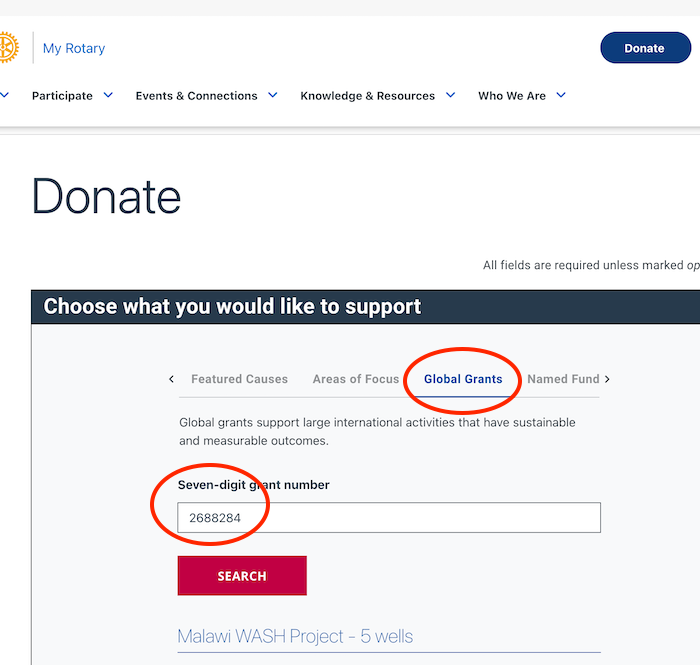 Donate on Club's behalf (desktop)
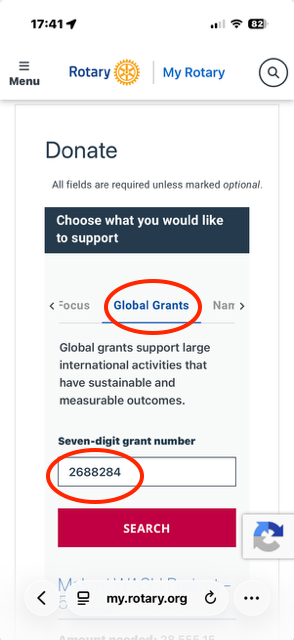 Donate on Club's behalf (mobile)
- Do NOT check the box "This donation is from my club or its members" (since you're logged in, TRF already knows who you are).
- Enter your donation amount. (If you'd like to increase it by 5% to cover TRF admin costs, feel free; otherwise, the Downers Grove Club will cover it).
- Enter the remaining payment details. (NOTE: the "Cover the fees" checkbox is NOT the 5% TRF admin fee, but something else. No need to check it; your call).
- Review and Submit.
- Please also send me (rotary@walquist.net) a screenshot of the receipt page, just to make extra-sure there is a record of your donation.
Giving a Pledge On Behalf of Your Club
Here is how to send in your club's pledge to The Rotary Foundation (which automatically credits your club with the appropriate Paul Harris recognition):
- Visit my.rotary.org and login.
- Click the "Donate" button on the menu.
- Click the "Global Grants" tab (NOT "Featured Causes"). You may need to scroll the tabs to the right.
- Enter the grant number: 2688284
- Click "Search". Your page should look something like this:
Donate on Club's behalf (desktop)
Donate on Club's behalf (mobile)
- Click "This donation is from my club or its members".
- Verify that "Donate from Club" is selected.
- Enter your donation amount. (If you'd like to increase it by 5% to cover TRF admin costs, feel free; otherwise, the Downers Grove Club will cover it).
- Enter the remaining payment details.
- Review and Submit.
- Please also send me (rotary@walquist.net) a screenshot of the receipt page, just to make extra-sure there is a record of your donation.
Giving with Check, Draft, or Wire
my.rotary.org has detailed instructions for how to do this. You'll need to fill out a contribution form (PDF download). Here is a sample with some key fields already completed:
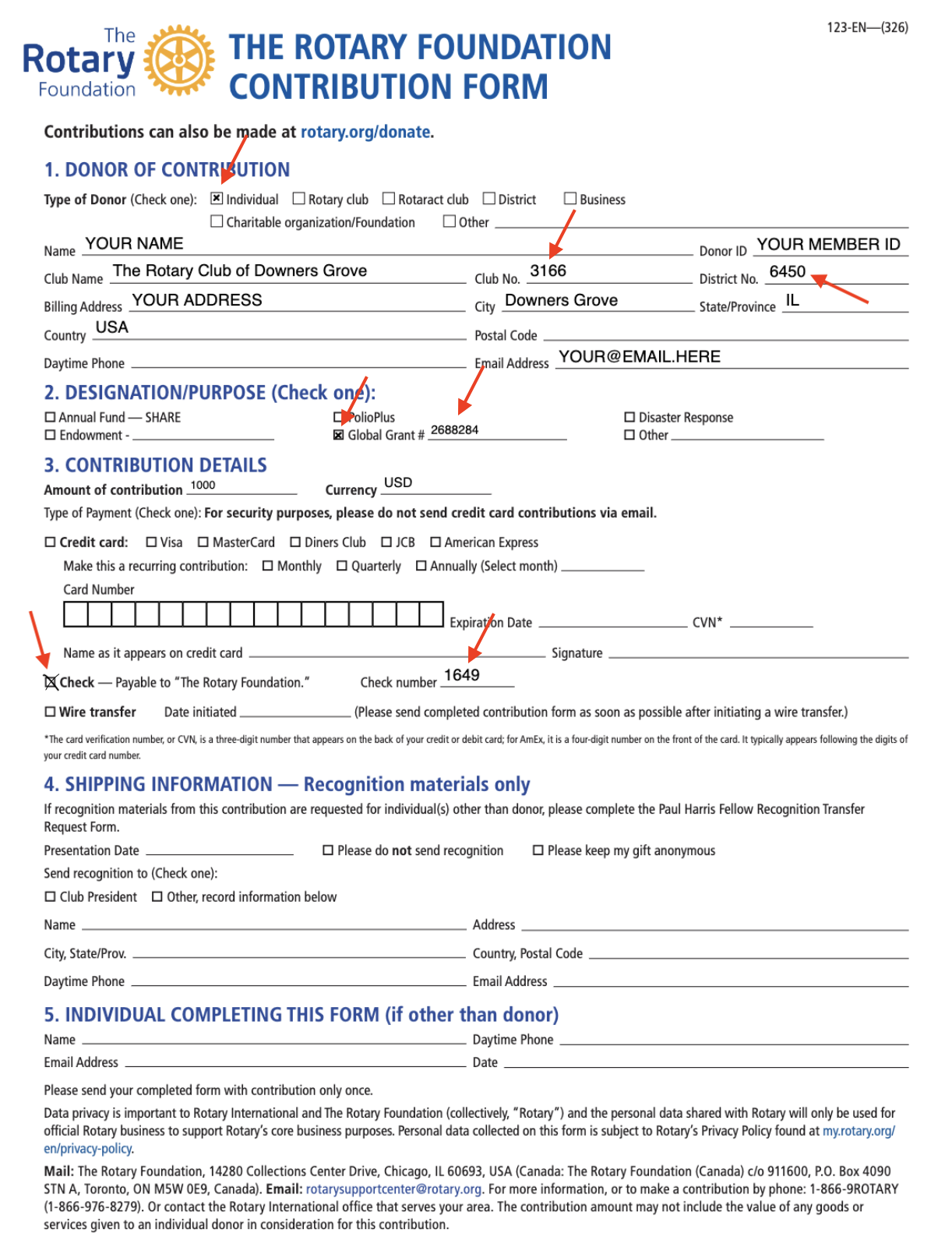 Contribution Form Example